


Description
The SOL PRO 3D scanner from Scan Dimension delivers metrology-grade accuracy of up to 0.05 mm (50 microns) in a compact desktop package built for product inspection, reverse engineering, and 3D printing workflows.
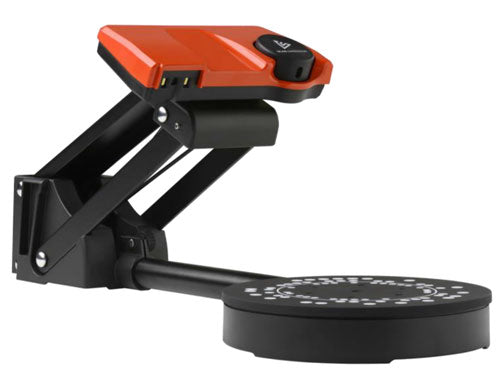
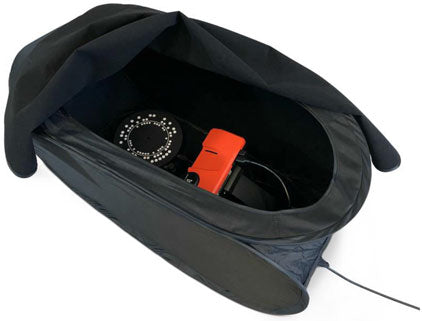
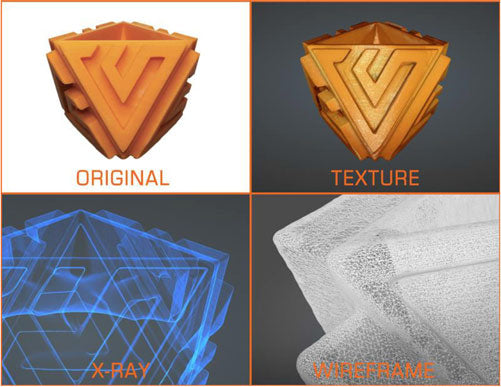
SOL PRO is one of the most accurate desktop 3D scanners available, combining true laser space conversion with white light technology and an 8 MP camera to capture volume, surface area, shape, size, and full-color HDR texture. Objects from 20 mm to 170 mm (0.8–6.7 in) in height and diameter are captured on the included turntable inside the blackout tent, with calibration, alignment, and meshing handled automatically by SOL PRO Creator software — no manual alignment and no cleanup of unwanted artifacts required.
Engineering, manufacturing, and design teams use SOL PRO to verify that machined and molded parts meet tolerance, to digitize legacy components for reverse engineering when no CAD file exists, and to create accurately sized reference geometry for industrial design and additive manufacturing. Finished models export as OBJ, STL, PLY, DAE, or XYZ for use in your existing CAD, inspection, or slicer software, or publish straight to Sketchfab in one click.
Why choose the SOL PRO 3D scanner:
- 0.05 mm max accuracy — Metrology-grade capture for quality assurance and part inspection tasks
- Three scanning modes — High accuracy, normal, or turbo (8-minute 360° pass at medium resolution)
- Fully automated processing — Calibration, alignment of up to five passes, and meshing run without user intervention
- Universal file output — OBJ, STL, PLY, DAE, and XYZ export into any CAD, inspection, or 3D printing workflow
- Complete kit in the box — Scanner, turntable, stand, blackout tent, calibration target, and USB 3.0 cable
SOL PRO 3D Scanner Specifications
| Specification | SOL PRO 3D Scanner | Professional Benefit |
|---|---|---|
| Maximum accuracy | Up to 0.05 mm (50 microns) | Verify machined and molded parts against tolerance specifications |
| Point distance | >0.26 mm | Dense point clouds preserve fine surface detail and edges |
| Camera resolution | 8 MP | High-resolution capture of both geometry and color texture |
| Scanning technology | True laser space conversion and white light | Dual-technology capture handles a broad range of surfaces |
| Process time per 360° scan* | 8 min. (medium resolution) / 15 min. (full resolution) | Choose speed or maximum detail depending on the job |
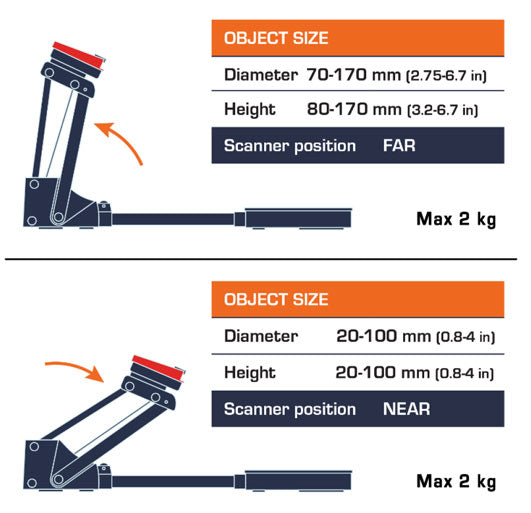
| Object size range | 20–170 mm (0.8–6.7 in) height and diameter | Sized for components, fixtures, prototypes, and small assemblies |
| Texture capture | Color in HDR quality | Documentation-ready models with realistic surface appearance |
| Scanning options | Dark surfaces / Unsteady object / Exclude texture | Adapt to difficult materials without external hardware changes |
| Automatic measurements | Volume / Surface area / Vertices / Faces | Immediate quantitative data without exporting to another package |
| Export file formats | OBJ, STL, PLY, DAE, XYZ | Compatible with mainstream CAD, inspection, and slicer software |
| Included software | SOL PRO Creator (scanning), SOL PRO Viewer (view and export) | No additional software license required to get started |
| Software updates | Automatic (requires registration) | Ongoing feature and performance improvements at no extra cost |
| Software languages | English, German, French, Italian, Spanish, Russian, Japanese, Simplified Chinese | Supports multilingual engineering and production teams |
| Connection and power | USB 3.0 port (max 800 mA) or powered USB 3.0 hub | Single-cable desktop setup with no separate power supply |
*Process time depends on computer hardware and object complexity. Specifications sourced from the Scan Dimension SOL PRO datasheet.
What's Included with the SOL PRO 3D Scanner
- SOL PRO 3D scanner — Laser and white light scanning head
- Turntable and scanner stand — Automated 360° object rotation
- Blackout tent — Controls ambient light for consistent scan quality
- Cylindrical target — Used for high-accuracy profiling and calibration
- USB 3.0 cable — Data and power over a single connection
- Software downloads — SOL PRO Creator and SOL PRO Viewer, plus one-click Sketchfab upload
- Manufacturer warranty — Backed by Scan Dimension
System Requirements
| Requirement | Details |
|---|---|
| Operating systems | Windows 11 and 10, 64-bit (x64); macOS Mojave or newer. Microsoft SQ and Apple M1 ARM CPUs are not supported. |
| Graphics card | Minimum 2 GB memory; must support OpenGL 3.3 or higher; OpenCL 1.2 or higher recommended |
| Recommended hardware | 2.4 GHz processor, 8 cores (16 logical processors), 32 GB RAM, 100 GB free system-drive space |
| Power input | USB 3.0 port (maximum 800 mA) or powered USB 3.0 hub |
| Internet | Required to access calibration data |
Quick Selection Guide
- Best for quality assurance teams: High accuracy mode (up to 0.05 mm, automatic volume and surface area measurement)
- Best for reverse engineering: Full resolution scan (15 min. per 360° pass, STL/OBJ export to CAD)
- Best for high-throughput digitizing: Turbo mode (8 min. per 360° pass at medium resolution)
- Best for industrial and product design: HDR color texture capture with one-click Sketchfab sharing
- Best for 3D printing shops: STL export with automatic meshing and no manual cleanup
SOL PRO 3D Scanner Frequently Asked Questions
Quick Answer: The SOL PRO scans objects from 20 mm to 170 mm (0.8–6.7 in) in both height and diameter.
What size objects can the SOL PRO 3D scanner handle?
The SOL PRO is designed for objects between 20 mm and 170 mm (0.8–6.7 inches) in height and diameter, which covers most machined components, injection-molded parts, fixtures, tooling inserts, and small prototypes. The SOL PRO Creator software displays two cylinders on screen that guide you to the recommended minimum and maximum object size before you start a scan, so you know immediately whether a part fits within the capture envelope.
Quick Answer: Up to 0.05 mm (50 microns) in high accuracy mode, with a point distance greater than 0.26 mm.
How accurate is the SOL PRO 3D scanner?
The SOL PRO achieves a maximum accuracy of up to 0.05 mm (50 microns) when using its high accuracy scanning mode with the included cylindrical profiling target. That level of precision places it among the most accurate desktop 3D scanners available and makes it suitable for product and part inspection work where dimensional verification matters. Normal and turbo modes trade some accuracy for faster processing when full metrology-grade precision isn't required for the task at hand.
Quick Answer: A complete 360° scan takes about 8 minutes at medium resolution or 15 minutes at full resolution.
How long does a complete 3D scan take?
A full 360° scanning pass on the SOL PRO takes approximately 8 minutes at medium resolution or 15 minutes at full resolution, including calibration and meshing. Actual times vary with your computer hardware and the geometric complexity of the object. Because calibration, alignment of up to five scanning passes, and mesh generation are all automated, the operator's hands-on time is limited to placing the object and selecting a mode.
Quick Answer: SOL PRO exports OBJ, STL, PLY, DAE, and XYZ files for use in third-party CAD, inspection, and 3D printing software.
What file formats does the SOL PRO 3D scanner export?
Scans export from SOL PRO Viewer as OBJ, STL, PLY, DAE, or XYZ. STL is the standard choice for 3D printing and slicer software, OBJ and DAE carry color texture for visualization and design work, and PLY and XYZ suit point-cloud and inspection workflows. Models can also be uploaded directly to Sketchfab in one click for sharing with clients or colleagues who don't have CAD software installed.
Quick Answer: Yes — SOL PRO Creator and SOL PRO Viewer are included as downloads with the scanner and update automatically.
Is software included with the SOL PRO 3D scanner?
Both applications are included at no additional cost. SOL PRO Creator runs the scanning process with automated calibration and meshing, and SOL PRO Viewer handles model viewing, rendering, and file export. The software is available for Windows and Mac, supports eight interface languages, and updates automatically once the scanner is registered. There is no separate subscription or per-seat license required to operate the scanner.
Quick Answer: Yes — SOL PRO Creator includes dedicated options for dark surfaces, unsteady objects, and excluding texture.
Can the SOL PRO scan dark or difficult surfaces?
SOL PRO Creator provides three scan options that address common problem cases: a dark surfaces setting for low-reflectance materials, an unsteady object setting for items that may shift slightly on the turntable, and an exclude texture option when only geometry is needed. These are software toggles selected before the scan begins. For extremely glossy or transparent parts, many users also apply a temporary 3D scanning spray, a standard practice across all optical scanning technologies.
Quick Answer: Windows 11 or 10 64-bit, or macOS Mojave and newer, with a USB 3.0 port and a 2 GB OpenGL 3.3 graphics card.
What computer do I need to run the SOL PRO 3D scanner?
SOL PRO requires Windows 11 or Windows 10 in 64-bit, or macOS Mojave or newer. Microsoft SQ and Apple M1 ARM processors are not supported. Your graphics card needs at least 2 GB of memory and OpenGL 3.3 support, with OpenCL 1.2 or higher recommended for faster processing. Scan Dimension recommends a 2.4 GHz 8-core processor, 32 GB of RAM, and 100 GB of free system-drive space. The scanner connects and draws power over a USB 3.0 port rated to 800 mA, or a powered USB 3.0 hub. An internet connection is required to retrieve calibration data.
Quick Answer: The scanner, turntable, stand, blackout tent, cylindrical calibration target, USB 3.0 cable, and both software applications.
What comes in the box with the SOL PRO 3D scanner?
Every SOL PRO ships as a complete desktop scanning kit: the scanner itself, a motorized turntable, the scanner stand, a USB 3.0 cable, a blackout tent that controls ambient light for consistent results, and a cylindrical target used for high-accuracy profiling. SOL PRO Creator and SOL PRO Viewer are provided as downloads, along with one-click Sketchfab upload and the manufacturer warranty. No additional accessories are required to begin scanning.
Texas 3D Scanning Experts: TAVCO has supported Texas engineering, manufacturing, and design teams with scanning and imaging technology since 1984. We serve Austin, Dallas, Houston, San Antonio, Corpus Christi, Bryan-College Station, Waco, and Victoria. Call 866-254-8590 or email info@tavco.net for quotes, volume pricing, or help matching the right scanner to your inspection and reverse engineering workflow.
Payment & Security
Your payment information is processed securely. We do not store credit card details nor have access to your credit card information.