



Description
Monthly payment plan available [ learn more & apply ]
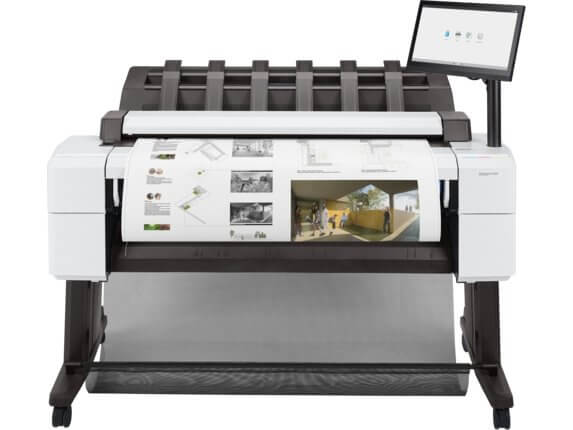
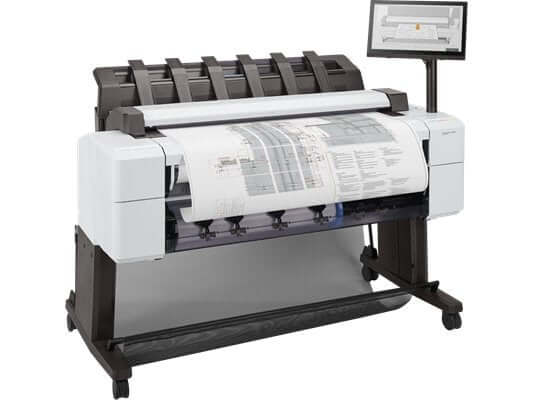
The HP DesignJet T2600 MFP Plus Edition is a 36-inch wide-format multifunction printer built for AEC, CAD, and GIS workgroups, combining print, copy, and scan in a single device with seamless cloud-connected workflows, AI-powered vectorization, and HP Wolf Pro Security.
The T2600 MFP Plus Edition extends HP's Seamless, Productive, Secure, and Build Connected value proposition specifically for teams that need to do more than print. Its integrated CIS scanner captures originals up to 600 dpi for scan-to-cloud and scan-to-folder workflows, while built-in connectivity to HP Build Workspace unlocks AI vectorization — converting scanned paper drawings into editable digital files and saving teams up to 80% of manual drafting time. The 15.6-inch touchscreen provides direct access to shared folders and cloud destinations, and the HP Click Driver enables PDF printing from any Windows 11 application without format conversion. All three variants include TAVCO professional installation.
Why choose the HP DesignJet T2600 MFP Plus Edition:
- Print + copy + scan in one device — Eliminates the need for a separate wide-format scanner; the integrated CIS scanner handles color at up to 3 in/sec and grayscale at up to 10 in/sec
- HP Build Workspace connectivity — Includes 1-year access to the HP Build Workspace platform with 20 AI vectorizations/month, converting scanned drawings to editable CAD files, and saving up to 80% of drafting time
- Easiest PDF printing workflow — HP Click and HP Click Driver enable direct printing from any Windows 11 application, with automated 100-page output stacking to minimize manual intervention
- 180 D/hr print speed — High-throughput output at 19.3 seconds per D-size drawing keeps multi-user AEC teams moving through peak print demand
- HP Wolf Pro Security — TLS 1.3, IPsec encryption, secure boot, and firmware validation protect confidential project files and network access
- QR-based version control — "Connected paper" experience links physical prints to digital workflows, helping teams avoid working from outdated drawing revisions
HP DesignJet T2600 MFP Plus Edition — Technical Specifications
| Specification | Details | Professional Benefit |
|---|---|---|
| Functions | Print, copy, scan | One device handles the full AEC document workflow — print new drawings, scan markups, and copy reference documents |
| Print Width | 36 in | Handles D-size (24"×36") and E-size (36"×48") drawings — standard for architecture, engineering, and GIS |
| Print Speed | 180 D/hr, 19.3 sec/D | One of the fastest 36-inch MFP plotters in its class; keeps large teams supplied without print queue bottlenecks |
| Print Technology | HP Thermal Inkjet | Proven inkjet reliability with lower maintenance overhead compared to laser-based wide-format alternatives |
| Print Quality (Best) | Up to 2400 × 1200 optimized dpi | Sharp line work and legible annotations on CAD drawings, GIS maps, and presentation renders |
| Line Accuracy | ±0.1% | Dimensional precision required for construction documents, site plans, and permit drawings |
| Ink System | 6 cartridges: C, M, Y, G, pK, mK (dye + pigment) | Pigment matte black for crisp technical lines; dye inks for vivid GIS maps, presentations, and color renders |
| Output Stacker | Up to 100 pages automated stacking | Unattended print runs with organized output collection — no staff needed at the printer between jobs |
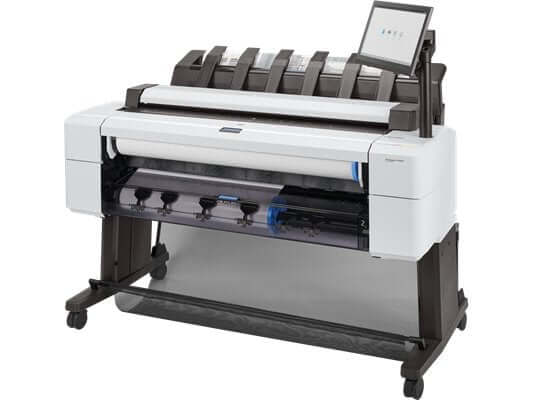
| Roll Handling | Single or dual roll; smart roll switching; automatic horizontal cutter | T2600dr dual-roll variant keeps two media types loaded simultaneously — no manual roll changes between mixed-format jobs |
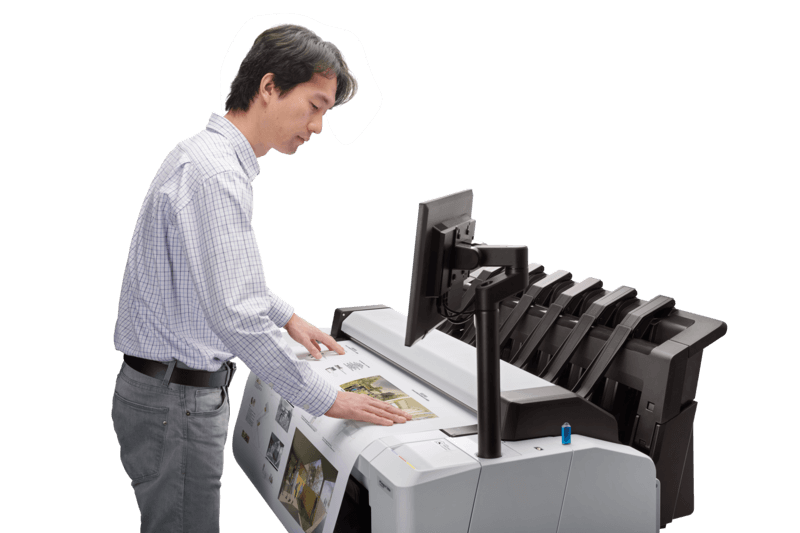
| Scanner Type | Sheetfed CIS (Contact Image Sensor); straight-through scan path for sheets and cardboard originals | Handles a wide range of originals, including thick cardboard — no document damage from forced bending |
| Scan Resolution | Up to 600 dpi optical | Sufficient resolution for archiving, reproduction, and AI vectorization of legacy paper drawings |
| Scan Speed | Up to 3 in/sec (color, 200 dpi); up to 10 in/sec (grayscale, 200 dpi) | Fast grayscale scanning for high-volume legacy drawing digitization projects |
| Copy Speed | Up to 6 in/sec (color, 200 dpi); up to 10 in/sec (grayscale, 200 dpi) | Rapid field-to-office document duplication without sending files to an outside reprographics shop |
| Copy Reduce / Enlarge | 25 to 400%, at 1% increments | Scale drawings between ANSI and ARCH standards or reduce E-size originals to D-size for field sets |
| HP Build Workspace | 1-year access included; 20 AI vectorizations/month | Converts scanned paper drawings to editable CAD files via AI — saves up to 80% of manual re-drafting time |
| Touchscreen Interface | 15.6-inch touchscreen | Direct access to shared folders, scan destinations, and print queues — without returning to a workstation |
| Connectivity | Gigabit Ethernet; Wi-Fi (optional); TCP/IP, IPP, SMBv3, 802.1X authentication | Integrates into enterprise networks with scan-to-cloud, scan-to-folder, and email delivery capabilities |
| Security | HP Wolf Pro Security; TLS 1.3; IPsec; secure boot; firmware validation; 500 GB self-encrypting drive | Protects sensitive project drawings, client files, and scan destinations from unauthorized access |
| Memory / Storage | 128 GB (file processing); 500 GB self-encrypting removable drive | Handles large-format PDF, CAD, and scanned raster files without processing delays |
| Media Sizes | 11 to 36 in wide; custom 8.3 × 11 to 36 × 48 in | Covers all standard ANSI and ARCH drawing sizes from letter to E-size |
| Media Types | Bond, coated, heavyweight coated, tracing, vellum, film, photo paper, backlit, self-adhesive/vinyl; up to 19.7 mil | One MFP handles technical drawings, presentation posters, GIS maps, and display graphics |
| Software Included | HP Click, HP Click Driver, HP Smart app, HP Web Jetadmin, HP JetAdvantage Security Manager, HP SmartTracker (optional) | Complete out-of-the-box toolset for print submission, fleet management, mobile printing, and cost tracking |
| Print Languages | Adobe PostScript 3, Adobe PDF 1.7, HP-GL/2, HP-RTL, TIFF, JPEG, CALS G4 | Native PostScript and PDF support for GIS software, Adobe workflows, and AEC applications |
| Noise Level | Up to 87% less noise vs. competition | Quiet enough for open-plan offices and shared workspaces without requiring a dedicated equipment room |
| Power Consumption | 120 W (printing); <36 W (ready); <10 W (sleep); ENERGY STAR® certified | Low standby power draw and ENERGY STAR certification support sustainability reporting goals |
| Dimensions (W × D × H) | 55 × 30 × 49 in; Single-roll: 234 lb | Compact MFP footprint — taller than the T1600 to accommodate the integrated scanner, but similar floor space |
| Warranty | One-year limited hardware warranty | Backed by TAVCO's HP-certified local service team across Texas |
*Print speed of 180 D/hr measured in Fast mode on D-size (24"×36") drawings. Scan speeds vary by resolution and color mode. HP Build Workspace access (1 year, 20 vectorizations/month) included with T2600 MFP Plus Edition purchase. Part numbers: 3XB78D (T2600 PS MFP), 3EK15D
Which T2600 MFP Plus Edition Variant Is Right for Your Team?
- Best for standard AEC MFP workgroups: T2600 PS MFP (+Install) — 36" print/copy/scan, 180 D/hr, HP Build Workspace connectivity, HP Click PDF workflow; best value entry into the T2600 platform
- Best for high-volume mixed-media environments: T2600dr PS MFP (2-roll +Install) — dual-roll loading with smart roll switching for teams that simultaneously run bond and coated media without manual swaps
- Best for government and compliance-sensitive organizations: T2600dr PS MFP TAA (2-roll +Install) — TAA-compliant configuration meeting federal procurement requirements; includes dual-roll and full PostScript/PDF support
HP DesignJet T2600 MFP Plus Edition — Frequently Asked Questions
Quick Answer: The HP DesignJet T2600 MFP Plus Edition is a 36-inch wide-format multifunction printer with integrated print, copy, and scan, plus HP Build Workspace connectivity for AI-powered CAD vectorization — designed for AEC, CAD, and GIS workgroups.
What is the HP DesignJet T2600 MFP Plus Edition, and what does it do differently from the original T2600?
The T2600 MFP Plus Edition is HP's updated 36-inch wide-format multifunction printer, refreshed with a Seamless, Productive, Secure, and Build Connected value proposition. It retains the print/copy/scan capabilities of the original T2600 while adding HP Build Workspace connectivity, providing 1-year access to HP's cloud platform with 20 AI vectorizations per month to convert scanned paper drawings into editable digital files. Additional enhancements include the HP Click Driver for direct Windows 11 PDF printing, an automated 100-page output stacker, HP Wolf Pro Security with TLS 1.3 and IPsec encryption, QR-based version control linking physical prints to digital workflows, and a compact design producing up to 87% less noise than competing models.
Quick Answer: HP Build Workspace is a cloud platform included with the T2600 MFP Plus Edition that uses AI to convert scanned paper drawings into editable CAD files — 20 vectorizations/month are included for 1 year, saving teams up to 80% of manual re-drafting time.
What is HP Build Workspace, and how does the T2600 MFP Plus Edition connect to it?
HP Build Workspace (HP BWs) is HP's cloud-connected platform for AEC document workflows. The T2600 MFP Plus Edition includes 1-year access to the platform with 20 AI vectorizations per month. The vectorization feature scans paper drawings through the T2600's integrated CIS scanner, uploads them to the HP Build Workspace platform, and converts the raster scan into editable vector CAD geometry — eliminating the need to manually redraw legacy drawings. HP states this workflow can save up to 80% of manual drafting time. After the included year, additional vectorization capacity is available through token bundles. TAVCO sells HP AI Vectorize token bundles separately for teams that exceed the monthly allotment.
Quick Answer: The T2600 MFP scans at up to 3 in/sec in color (200 dpi) and up to 10 in/sec in grayscale (200 dpi), with an optical resolution of up to 600 dpi, using a CIS (Contact Image Sensor) with a straight-through paper path.
What are the scanning capabilities of the HP DesignJet T2600 MFP Plus Edition?
The T2600 MFP Plus Edition includes a sheetfed CIS (Contact Image Sensor) scanner with a straight-through paper path that accommodates both standard roll-fed originals and thicker cardboard documents without bending them. Optical scan resolution is up to 600 dpi. Color scanning runs at up to 3 inches per second at 200 dpi, while grayscale scanning reaches up to 10 inches per second at 200 dpi — making it well-suited for rapid digitization of large drawing sets. Scans can be routed to shared network folders, cloud storage destinations, or emailed directly from the 15.6-inch touchscreen, and are the source for HP Build Workspace AI vectorization workflows.
Quick Answer: The T2600 MFP Plus Edition includes HP Wolf Pro Security with TLS 1.3, IPsec encryption, secure boot, firmware validation, and a 500 GB self-encrypting removable hard drive to protect sensitive project drawings and network access.
What security features does the HP DesignJet T2600 MFP Plus Edition include?
The T2600 MFP Plus Edition ships with HP Wolf Pro Security — HP's enterprise protection stack covering the device, data, and network access. TLS 1.3 and IPsec encrypt data transmission across print and scan workflows. Secure boot verifies firmware integrity at every startup, and runtime firmware validation detects and rejects unauthorized code. The 500 GB self-encrypting removable hard drive protects stored files at rest. Network authentication supports 802.1X (LEAP, PEAP, EAP-TLS), NTLM v2, and SMBv3, enabling integration with enterprise identity systems. These features are particularly relevant for government contractors, oil and gas companies, and AEC firms handling confidential client project data.
Quick Answer: The T2600 PS MFP is a single-roll unit; the T2600dr PS MFP adds a second roll spindle with smart roll switching; and the T2600dr PS MFP TAA is the TAA-compliant dual-roll version for federal government procurement.
What is the difference between the T2600 PS MFP, T2600dr PS MFP, and T2600dr PS MFP TAA variants?
All three T2600 MFP Plus Edition variants include print, copy, and scan, with native language support for Adobe PostScript 3 and Adobe PDF 1.7. The distinction lies in roll configuration and procurement compliance. The T2600 PS MFP is a single-roll unit — the standard configuration for most AEC workgroups. The T2600dr PS MFP adds a second roll spindle with smart roll switching, enabling two media types (for example, 20 lb bond and 24 lb coated) to be loaded simultaneously so the printer selects the correct roll per job automatically. The T2600dr PS MFP TAA version is identical to the dual-roll dr in functionality but is manufactured to Trade Agreements Act compliance standards, meeting federal and government agency procurement requirements. All three include TAVCO professional installation.
Quick Answer: QR-based version control links a printed drawing to its current digital file — team members can scan the QR code on a printout to verify they are working from the latest revision, reducing errors caused by outdated drawings.
What is the "connected paper" QR-based version control feature on the T2600 MFP Plus Edition?
The T2600 MFP Plus Edition supports a "connected paper" workflow in which prints are issued with embedded QR codes that link back to the digital source file. When a team member scans the QR code on a physical drawing — with a phone or scanner — they can immediately verify whether the print represents the current revision or whether an updated version exists in the project's digital workflow. This addresses one of the most common problems in the AEC field: teams working from outdated drawing sets without realizing that revisions have been issued. The feature is designed to work in conjunction with HP Build Workspace and connected document management environments.
Quick Answer: Yes — TAVCO includes professional on-site installation with every HP DesignJet T2600 MFP Plus Edition purchase, with direct service across Austin, Dallas, Greater Houston, San Antonio, and other Texas markets.
Does TAVCO include installation with the HP DesignJet T2600 MFP Plus Edition?
Yes. Every HP DesignJet T2600 MFP Plus Edition purchased from TAVCO includes professional on-site installation by our certified technicians. Installation covers physical assembly, network configuration, driver and HP Click software setup, scan-to-folder and scan-to-cloud destination configuration, and an initial print and scan verification. TAVCO provides direct installation service across Austin, Bryan-College Station, Dallas, Greater Houston, San Antonio, Corpus Christi, Victoria, and Waco. Remote installation support is also available for organizations outside these markets. Call 866-254-8590 to confirm scheduling before your unit ships.
Quick Answer: The T2600 MFP Plus Edition uses HP 730 (300 ml) and HP 712 (130 ml) ink cartridges in a 6-color system: cyan, magenta, yellow, gray, photo black (dye), and matte black (pigment). TAVCO stocks OEM cartridges with volume pricing available.
What ink cartridges does the HP DesignJet T2600 MFP Plus Edition use?
The T2600 MFP Plus Edition uses the same 6-color ink system as the T1600 Plus Edition: HP 730 series (300 ml high-capacity) and HP 712 series (130 ml) cartridges in cyan, magenta, yellow, gray, photo black (dye-based), and matte black (pigment-based). The pigment matte black cartridge delivers the sharp, crisp line definition required for technical CAD drawings on bond paper, while the dye-based inks produce vivid color for GIS maps, presentation posters, and color renders. TAVCO maintains an in-stock inventory of HP OEM ink for the T2600 — contact us for volume pricing on cartridge bundles.
Texas HP DesignJet MFP Experts: TAVCO has been supporting AEC, engineering, and GIS teams across Texas with wide-format multifunction printers since 1984. Call 866-254-8590 or email info@tavco.net for volume pricing, financing options, TAA procurement questions, or to schedule your installation.
pn: 3XB78A, 3EK15A, 3EK15B
Designjet T 2600 MFP Plus Edition
Payment & Security
Your payment information is processed securely. We do not store credit card details nor have access to your credit card information.