

Description
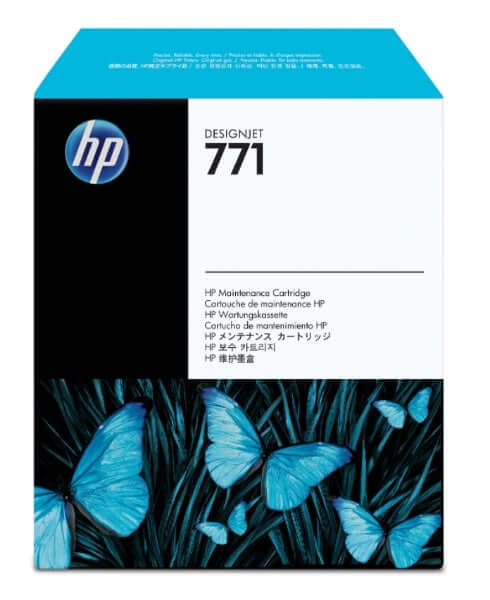
Maintain peak performance and print quality for your HP DesignJet Z6200, Z6600, Z6800, and Z6810 photo production printers with the genuine HP 771 DesignJet Maintenance Cartridge (CH644A), engineered to collect waste ink, prevent printheads from clogging, and ensure consistent, professional output.
The HP 771 Maintenance Cartridge serves as a critical service component in HP's Z-series photo production printer system, collecting excess ink during printheads' cleaning cycles, capturing ink aerosol generated during high-speed printing operations, and sealing printheads when not in use to prevent drying out.
This essential maintenance component works automatically during printer cleaning routines, removing trapped ink and debris through HP's precision extraction process while maintaining optimal printing conditions. Printer alerts notify you when a cartridge replacement is required, typically after significant print volumes, ensuring uninterrupted production.
Designed exclusively for HP DesignJet Z6200, Z6600, Z6610, Z6800, and Z6810 production environments, this genuine HP maintenance cartridge protects your investment by preventing costly printhead damage and maintaining consistent photo-quality output across extended production runs.
Why choose the genuine HP 771 Maintenance Cartridge:
- Essential printer maintenance component — Collects waste ink and prevents printhead contamination during cleaning cycles
- Prevents printhead clogging — Removes ink aerosol and debris to maintain optimal nozzle performance
- Automatic operation — Works seamlessly with printer maintenance routines without user intervention
- Protects printhead investment — Prevents expensive printhead damage caused by waste ink accumulation
- Printer alert system — Automatic notifications when cartridge replacement is needed
- Quick replacement process — Simple installation minimizes printer downtime
- Genuine HP quality — Engineered specifically for Z-series photo production printers
- 100% recyclable packaging — Environmentally responsible materials support sustainability goals
HP 771 Maintenance Cartridge Specifications
| Product Type | Maintenance Cartridge |
| HP Part Number | CH644A |
| HP Product Number | HP 771 |
| Primary Function | Waste ink collection and printhead protection |
| Compatible Printers | HP DesignJet Z6200 42"/60", Z6600 60", Z6610 60", Z6800 60", Z6810 42"/60" |
| Replacement Indicator | Automatic printer alert when cartridge is full |
| Installation | User-replaceable, tool-free installation |
| Dimensions | 294 × 63 × 265 mm (W × D × H) |
| Weight | 0.90 kg (empty) |
| Package Weight | 1.08 kg |
| Environmental | 100% recyclable packaging materials |
| Warranty | HP Limited Warranty - free from defects in materials and workmanship |
| Recycling Program | HP Planet Partners - free prepaid return and recycling |
HP 771 Maintenance Cartridge - Frequently Asked Questions
Quick Answer: The HP 771 Maintenance Cartridge collects waste ink generated during printhead cleaning cycles and normal printing operations, removes ink aerosol to maintain print quality, and seals printheads when not in use to prevent drying and clogging.
What does the HP 771 Maintenance Cartridge do?
The HP 771 Maintenance Cartridge performs three critical functions in HP DesignJet Z-series photo production printers. First, it collects waste ink generated during automated printhead cleaning cycles, which HP printers perform regularly to maintain optimal nozzle performance and prevent clogging. Second, the cartridge captures ink aerosol particles created during high-speed printing operations, removing these airborne ink droplets before they can settle on internal printer components or compromise print quality. Third, the maintenance cartridge helps seal printheads when the printer is idle, preventing ink from drying in the nozzles during periods of non-use. This three-part functionality protects your expensive HP 771 printheads from damage, maintains consistent photo-quality output, and extends overall printer reliability. The cartridge operates automatically without user intervention, working behind the scenes during routine printer maintenance to ensure your Z6200, Z6600, Z6800, or Z6810 continues delivering professional results.
Quick Answer: Your HP DesignJet printer will display an automatic alert message when the maintenance cartridge is full and requires replacement. The alert appears on the printer control panel with clear instructions for cartridge replacement.
How do I know when to replace the HP 771 Maintenance Cartridge?
HP DesignJet Z-series printers monitor maintenance cartridge capacity automatically and display clear on-screen alerts when replacement is needed. The printer control panel will show a maintenance cartridge warning when the unit approaches capacity, followed by a critical alert when the cartridge is full and must be replaced before printing can continue. Unlike ink cartridges, which are depleted based on printed area, maintenance cartridge replacement frequency depends on your specific printing patterns, including print mode (Best/Normal/Fast), printheads cleaning frequency, and total print volume. High-volume photo production environments may require monthly maintenance cartridge replacement, while lower-volume users may see 2-3 months between replacements. Do not continue printing when the maintenance cartridge is full, as this can cause waste ink overflow, damage internal printer components, and potentially void your printer warranty. Keep a spare HP 771 Maintenance Cartridge on hand to avoid production delays, as the cartridge has no expiration date and can be stored indefinitely in its sealed packaging.
Quick Answer: Installation takes 2-3 minutes with simple steps: opeand is simplen the maintenance cartridge door, remove the full cartridge, insert the new cartridge until it clicks into place, close the door, and the printer automatically recognizes the new cartridge.
How difficult is it to replace the HP 771 Maintenance Cartridge?
Replacing the HP 771 Maintenance Cartridge requires no technical expertise or special tools, taking approximately 2-3 minutes from start to finish. The process involves opening the clearly marked maintenance cartridge access door on the left side of your HP DesignJet printer, grasping the handle on the installed cartridge and pulling it straight out, unwrapping the new HP 771 Maintenance Cartridge from its packaging, sliding the new cartridge into the vacant slot until you hear a positive click indicating proper seating, and closing the access door. The printer automatically detects the new cartridge and resets its maintenance tracking system without requiring any user configuration. The entire replacement procedure can be performed while the printer is powered on, and you can resume printing immediately after installation. Used maintenance cartridges contain waste ink and should be handled carefully to avoid spillage—place the removed cartridge directly into the plastic bag included with your new replacement cartridge, then recycle it through HP Planet Partners using the prepaid shipping label available at HP's website or through TAVCO.
Quick Answer: Yes, the HP 771 Maintenance Cartridge (CH644A) is compatible with all HP DesignJet Z6200, Z6600, Z6610, Z6800, and Z6810 photo production printers in both 42" and 60" widths.
Is the HP 771 Maintenance Cartridge compatible with all Z-series printers?
The HP 771 Maintenance Cartridge (CH644A) is specifically designed for compatibility with HP's Z-series photo production printer family, including the DesignJet Z6200 42" (CQ109A) and 60" (CQ111A), Z6600 60" production printers, Z6610 60" production printers, Z6800 60" photo production printers (F2S72A), and Z6810 42" (2QU12A) and 60" (2QU14A) production printers. All these printer models use the identical maintenance cartridge design and share the same waste ink collection system architecture. The CH644A maintenance cartridge is NOT compatible with other HP DesignJet printer series such as T-series (which use different maintenance cartridge part numbers) or older Z-series models predating the Z6200. Always verify your printer model before ordering replacement maintenance cartridges—using an incorrect maintenance cartridge can result in improper fit, printer errors, or potential damage to the printer's waste ink collection system. TAVCO stocks genuine HP 771 Maintenance Cartridges specifically for Z6200/Z6600/Z6800/Z6810 applications with same-day shipping available throughout Texas.
Quick Answer: Attempting to print with a full maintenance cartridge can cause waste ink overflow, damage internal printer components, contaminate prints, and potentially void your warranty. Always replace the cartridge promptly when alerted.
What happens if I don't replace the maintenance cartridge when the printer alerts me?
Ignoring maintenance cartridge replacement alerts can result in serious consequences for your HP DesignJet printer and print quality. When the maintenance cartridge reaches capacity, continued printing attempts can cause waste ink overflow into internal printer components, leading to contamination of the printer's electronics, damage to the printhead carriage assembly, ink leakage onto prints causing quality defects, and potential printer malfunction requiring professional service intervention. HP DesignJet printers are designed to prevent printing when the maintenance cartridge is critically full, displaying error messages that halt operations until the cartridge is replaced, this safety feature protects your printer investment but can cause unexpected production interruptions if you lack a replacement cartridge on hand. Warranty implications also exist: damage caused by operating the printer with an overfilled maintenance cartridge may not be covered under HP's standard warranty, potentially resulting in costly out-of-pocket repairs. For production environments, TAVCO recommends maintaining at least one spare HP 771 Maintenance Cartridge in inventory to avoid downtime, as the cartridge has no expiration date and can be stored indefinitely.
Quick Answer: No, you should always use genuine HP 771 Maintenance Cartridges (CH644A). Third-party alternatives may not properly collect waste ink, can damage your printer, and will void your HP warranty.
Can I use a third-party or refilled maintenance cartridge instead of genuine HP?
TAVCO strongly recommends using only genuine HP 771 Maintenance Cartridges (CH644A) in your DesignJet Z-series printers. Unlike ink cartridges where third-party alternatives sometimes offer viable cost savings, maintenance cartridges involve precision-engineered waste ink collection systems that require exact specifications to function properly. Third-party maintenance cartridges may use different absorbent materials with inadequate capacity, improper sealing mechanisms that allow waste ink leakage, or incompatible sensor technologies that prevent accurate fill-level detection by the printer. Using non-genuine maintenance cartridges immediately voids HP's printer warranty, meaning any damage caused by improper waste ink collection becomes your financial responsibility rather than being covered under warranty protection. Genuine HP 771 Maintenance Cartridges are specifically designed to work with HP's automated printhead cleaning algorithms, ensuring proper waste ink containment during the intensive cleaning cycles required for photo-quality output. Given the relatively low cost of maintenance cartridges compared to potential printer repair expenses or printhead replacement costs, the modest savings from third-party alternatives represents poor value relative to the substantial risks involved.
Quick Answer: Keep spare maintenance cartridges in their sealed packaging at room temperature (59-86°F) in a dry location. They have no expiration date and can be stored indefinitely until needed.
How should I store spare HP 771 Maintenance Cartridges?
Store unused HP 771 Maintenance Cartridges in their original sealed packaging at typical room temperatures between 59-86°F (15-30°C) in a location with moderate humidity levels. Unlike ink cartridges which have expiration dates based on their consumable contents, maintenance cartridges contain only absorbent material and have no shelf life limitations—you can safely store spare cartridges indefinitely without performance degradation. Keep cartridges in their sealed packaging until ready for installation to prevent dust accumulation on the cartridge surface or entry points. For photo production facilities managing multiple HP DesignJet printers, maintaining a small inventory of maintenance cartridges (typically 1-2 spares per active printer) ensures you can respond immediately to replacement alerts without production delays. Avoid storing maintenance cartridges in areas with extreme temperature fluctuations (near loading docks, exterior walls, or HVAC equipment), high humidity environments (which could affect the absorbent material), or locations with exposure to direct sunlight. Used maintenance cartridges containing waste ink should be placed immediately into the plastic disposal bag provided with your replacement cartridge and prepared for recycling through HP Planet Partners—do not store used cartridges for extended periods as they may develop odors or potential leakage issues.
Quick Answer: Yes, HP Planet Partners provides free prepaid return shipping for used maintenance cartridges. Place the used cartridge in the provided disposal bag and request a free return label from HP or TAVCO.
Can I recycle used HP 771 Maintenance Cartridges?
HP offers free recycling for all HP 771 Maintenance Cartridges through the HP Planet Partners program, making disposal convenient and environmentally responsible. When you replace a maintenance cartridge, place the used unit immediately into the disposal bag included with your new replacement cartridge to contain any residual waste ink. Visit HP's Planet Partners website to request a free prepaid shipping label, or contact TAVCO who can provide prepaid return materials as part of our customer service. HP processes returned maintenance cartridges through specialized recycling facilities that safely extract and dispose of waste ink according to environmental regulations, recover plastics for remanufacturing into new HP products, and ensure proper handling of all components. For photo labs and production facilities generating multiple used maintenance cartridges monthly, HP offers bulk collection programs with scheduled pickups, simplifying recycling logistics for high-volume operations. The HP 771 Maintenance Cartridge packaging itself uses 100% recyclable materials (cardboard and paper-based components), supporting comprehensive environmental responsibility throughout the product lifecycle. By participating in HP Planet Partners recycling, Texas photo production facilities support circular-economy principles while maintaining compliance with corporate sustainability initiatives and waste-management requirements.
Texas HP DesignJet Maintenance Experts: TAVCO offers genuine HP 771 Maintenance Cartridges with fast shipping. Our certified HP technicians provide expert guidance on preventive maintenance schedules, printer servicing, and supply management to keep your Z-series photo production systems operating at peak performance. We recommend keeping at least one spare maintenance cartridge on hand for production environments to avoid unexpected downtime. Call 866-254-8590 for maintenance cartridge orders, printer service scheduling, or technical support.
Payment & Security
Your payment information is processed securely. We do not store credit card details nor have access to your credit card information.